Where heavy work runs: CPU or GPU, here or on a node
Two things in phonometry take long enough to want a faster machine: stepping an FDTD engine, acoustic or elastic, and writing a video of it. Both can run on this machine or on a node you reach over SSH, and both can use a GPU when one is there. This page is the map; each road has a page of its own.
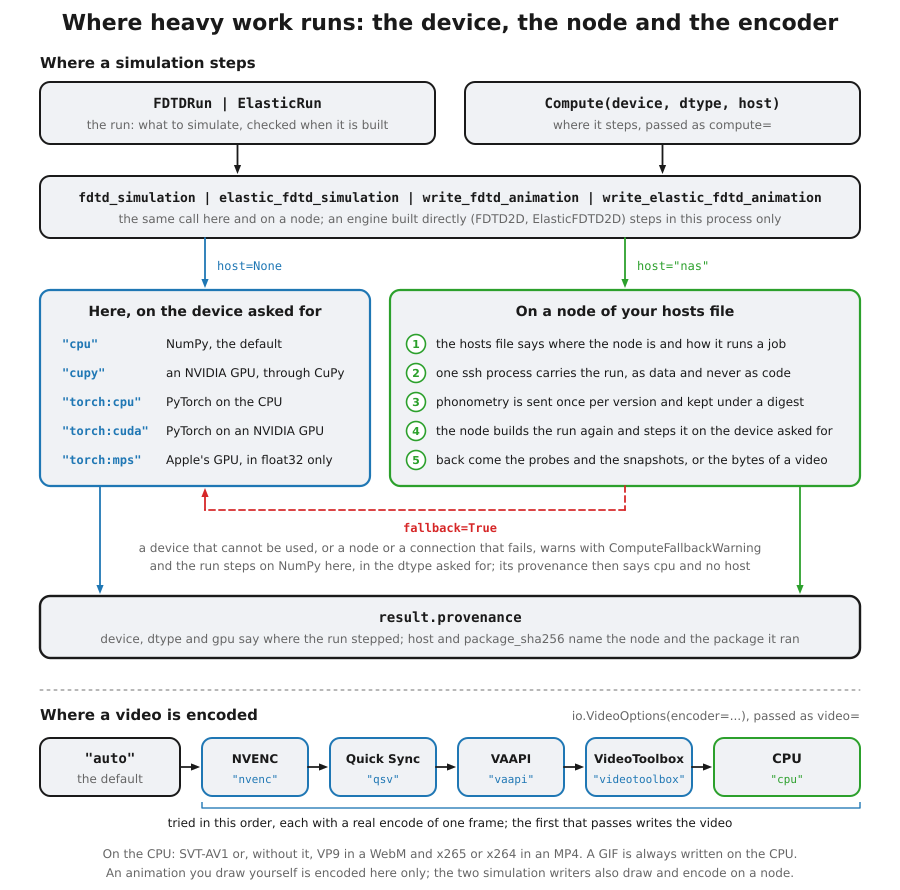
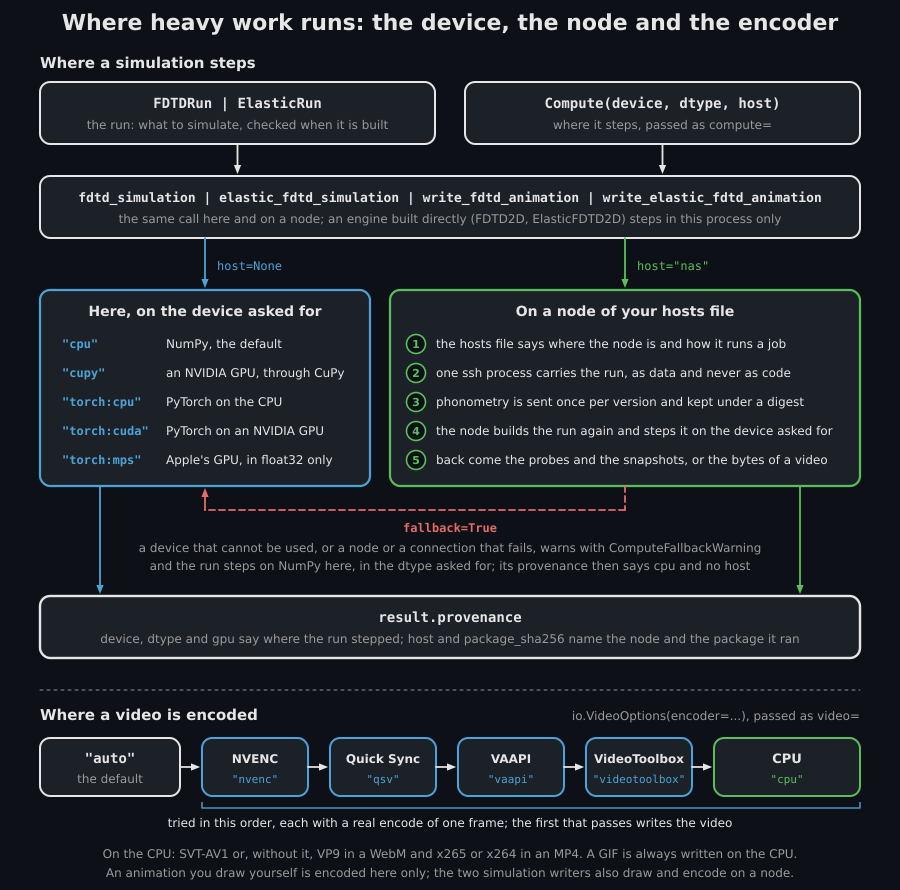
The page on one sheet. Above, a run and a Compute record go into one of the
four functions that take a host: with none the run steps here, on one of five
devices, and with one it goes to a node, in five steps. Both roads end in
result.provenance, and fallback=True brings a device that cannot be used,
or a node or a connection that fails, back to NumPy here. Below, the order
encoder="auto" tries the encoders in, each with an encode of one frame.
Where a simulation steps
Section titled “Where a simulation steps”A run is a record of what to simulate (FDTDRun, or ElasticRun for the
elastic engine), checked when it is built. Where it steps is apart from it: a
Compute record, passed as compute= to fdtd_simulation,
elastic_fdtd_simulation, the two engines and the two simulation writers,
so the same run steps anywhere. With nothing passed, no use() block around
the call and no PHONOMETRY_COMPUTE set it steps on NumPy, here, in
float64, and every result records where it ran:
from phonometry import simulation
run = simulation.FDTDRun( c=343.0, dx=0.02, duration_s=4.0e-3, shape=(60, 80), sources=[simulation.GaussianPulse(ix=20, iy=30, half_width_s=3.0e-4)], recording=simulation.FDTDRecording(probes=[(60, 30)]),)res = simulation.fdtd_simulation(run)print(res.provenance.device, res.provenance.host) # cpu None| Device | Steps on | What to install | What is promised |
|---|---|---|---|
"cpu" |
NumPy, on this machine’s CPU | nothing | in float64 the reference, bit for bit; in float32 within a published bound |
"cupy" |
an NVIDIA GPU | the CuPy wheel for your CUDA version | in float64 the fields bit for bit, as measured; in float32 no measured bound yet |
"torch:cpu" |
PyTorch on the CPU | pip install torch --index-url https://download.pytorch.org/whl/cpu, then pip install "phonometry[torch]" |
within a published bound |
"torch:cuda" |
PyTorch on an NVIDIA GPU | pip install "phonometry[torch]" |
no measured bound yet |
"torch:mps" |
Apple’s GPU, in float32 only | pip install "phonometry[torch]" |
within a published float32 bound |
On Linux the CPU line takes torch from PyTorch’s CPU index first, because the torch that PyPI serves there brings gigabytes of CUDA libraries a CPU never uses.
Where a simulation runs explains each
device, the use() block and the PHONOMETRY_COMPUTE variable, the fallback
to NumPy, what provenance records beside the device and the host (the
dtype, the versions it ran with, the GPU and the package a node ran), and the
measurements behind the last column.
Here or on a node
Section titled “Here or on a node”Give the record a host, the name of an entry of your hosts file (nas
here), and the same call runs on that node, with the result coming back as
if it had run here:
gpu_node = simulation.Compute(device="cupy", host="nas")res = simulation.fdtd_simulation(run, compute=gpu_node)print(res.provenance.host, res.provenance.gpu) # nas, and the card's nameA node is an entry of your hosts file, reached over SSH, running the node’s
container image or a Python environment of its own. A job names a library
function and carries its run as data, never code of your own; the node runs
the phonometry you have here, sent once per version, and its answer is
checked before it is trusted. An engine built directly (FDTD2D,
ElasticFDTD2D) steps in this process: your own code drives it, step by
step, and that cannot travel.
Sending a simulation to a remote node
explains the hosts file, the node image and what each side trusts.
Where a video is encoded
Section titled “Where a video is encoded”A video is drawn with matplotlib and encoded by ffmpeg, on a CPU encoder or
a GPU one. How it is encoded is a record of its own, io.VideoOptions, which
io.write_video and the two simulation writers,
simulation.write_fdtd_animation and
simulation.write_elastic_fdtd_animation, take as video=; with none, the
encoder is chosen for you (encoder="auto"). Writing a video here takes
pip install "phonometry[plot]" and an ffmpeg on PATH, a program and not
a Python package. On a node both are the node’s: its Docker image holds
them, a Python node needs matplotlib in its environment and ffmpeg on its
PATH, and this machine needs neither unless fallback=True brings a
failed run back here.
A simulation writer draws one frame for each snapshot its run records, so the
snapshot cadence is the frame cadence: with
recording=simulation.FDTDRecording(snapshot_every=10), or
simulation.ElasticRecording(snapshot_every=10) for the elastic engine, it
draws the field at t = 0 and every ten steps, and a run that records no
snapshots is refused with ValueError. The run of the table and of the
code below records them. No frame is stored: the writer’s result holds the
probes, the times and the provenance, with snapshots at None.
| A CPU encoder | A GPU encoder | |
|---|---|---|
| Here | io.write_video(path, animation, video=io.VideoOptions(encoder="cpu")): SVT-AV1, or without it VP9 in a WebM and x265 or x264 in an MP4 |
VideoOptions(encoder="auto"), the default, tries NVENC, Quick Sync, VAAPI, VideoToolbox and then the CPU, each with a real one-frame encode |
| On a node | simulation.write_fdtd_animation(path, run, compute=simulation.Compute(host="nas"), video=io.VideoOptions(encoder="cpu")) |
simulation.write_fdtd_animation(path, run, compute=simulation.Compute(device="cupy", host="nas"), video=io.VideoOptions(encoder="nvenc")): the node computes, draws and encodes. On a Docker node NVENC needs a GPU placement ("cupy" or "torch:cuda"), the one that hands the container its NVIDIA GPU, and the container is given no other device; a Python node’s ffmpeg uses what its machine has, whatever the placement |
from phonometry import io, simulation
io.write_video("wave.webm", animation)   # any matplotlib animation, encoded hererun = simulation.FDTDRun(    c=343.0, dx=0.01, duration_s=4.0e-3, shape=(200, 300),    sources=[simulation.GaussianPulse(ix=60, iy=100, half_width_s=3.0e-4)],    recording=simulation.FDTDRecording(snapshot_every=10),)simulation.write_fdtd_animation(    "pulse.webm", run,    compute=simulation.Compute(device="cupy", host="nas"),    video=io.VideoOptions(encoder="nvenc"),)
The frame a writer draws (its language, its size, the colour limit) is a
record of its own too, simulation.AnimationFrame, passed as frame=. A
GIF is always written on the CPU.
An animation you draw yourself is encoded here only: what travels to a node is what the library can draw again there, the two simulation writers. Writing animations and FDTD runs to video explains the containers, the codecs, the encoders and the quality presets.
Which to choose
Section titled “Which to choose”- A small grid steps as fast on NumPy, or faster: a GPU pays a fixed cost for every operation it launches, and only a grid large enough earns it back.
- A large grid and an NVIDIA GPU here:
Compute(device="cupy"). - A Mac:
Compute(device="torch:mps", dtype="float32"), with the float32 bound the compute page publishes. - No GPU here, one on a machine you can reach: the same record with
host=. - A video:
io.VideoOptions(encoder="auto"), the default, here, or the simulation writers with a host when the drawing should happen next to the GPU too.
What this guide covers
Section titled “What this guide covers”Covered
The map of where phonometry’s heavy work runs: the devices a simulation steps on, a node named in the hosts file, and the CPU and GPU encoders of a video, here or on a node, with the page that explains each.
Not covered
Running code of your own on a node: only the library’s functions travel, with their arguments as data. Encoding on a node an animation drawn here. JAX and the other array libraries. NVENC, Quick Sync, VAAPI and VideoToolbox are tried and used, and not tested in CI.