Performance Tuning
Most deployments work well with the defaults. Tune these settings when startup reconciliation handles large CAPI lists, a slow router times out, or you need predictable restart windows.
Connection pool
Section titled “Connection pool”mikrotik.pool_size controls how many RouterOS API sessions the bouncer can use for parallel work such as reconciliation removals.
mikrotik: pool_size: 4Guidance:
| Router class | Suggested value |
|---|---|
| Small home router | 1-2 |
| Mid-range RouterOS 7 | 4 |
| Large CAPI deployments | 6-8 |
The configured value must be between 1 and 20. On startup, the bouncer queries RouterOS API max-sessions and caps the effective pool to max-sessions - 2, ensuring at least two sessions remain available for other RouterOS operations.
Check or raise the RouterOS limit:
/ip/service/print where name=api/ip/service/set api max-sessions=1000Bulk add behavior
Section titled “Bulk add behavior”During reconciliation, additions with the default bulk_add_method: script go out as RouterOS scripts of up to 100 addresses each, instead of one API call per IP. On RouterOS 7.8rc1 and later each script is a single /execute call; on older versions it is a temporary /system/script that the bouncer creates, runs and removes.
That chunk size is not about message size — the RouterOS API takes words far larger than these scripts, and a chunk of 1,000 entries transfers without complaint. It is the trade between amortizing the round trips each chunk costs (one with /execute; four with a stored script: find, add, run, remove) and how long a single non-interruptible script run holds the router. /execute adds a hard cap of its own: it takes no script over 64 kB, and a chunk of 100 entries is around 22 kB.
Sweeping it against an RB5009 with the stored script — five interleaved rounds of 4,000 entries at 50/100/250/500/1000 — the medians land between 4.36 s and 5.78 s across that whole 20× range. The useful result is that the sweep cannot resolve a winner: within one chunk size the interquartile range reaches 2.55 s, larger than the 1.43 s that separates the best size from the worst, and which size looks best depends on which estimator you use (median and minimum pick 1,000; the mean picks 100).
What is stable is the shape: inserting a row costs ~1.2–1.3 ms and dominates everything else, so a 22,000-entry import spends roughly 27 s inserting against somewhere between 0.2 s and 2.3 s of chunk scaffolding. There is no reason to change this value, and no measurement here that would tell you what to change it to.
If a bulk script fails, the bouncer logs a warning and falls back to individual adds for that chunk. Duplicate entries are skipped or refreshed without reconnecting the API session.
What the first reconciliation costs the router
Section titled “What the first reconciliation costs the router”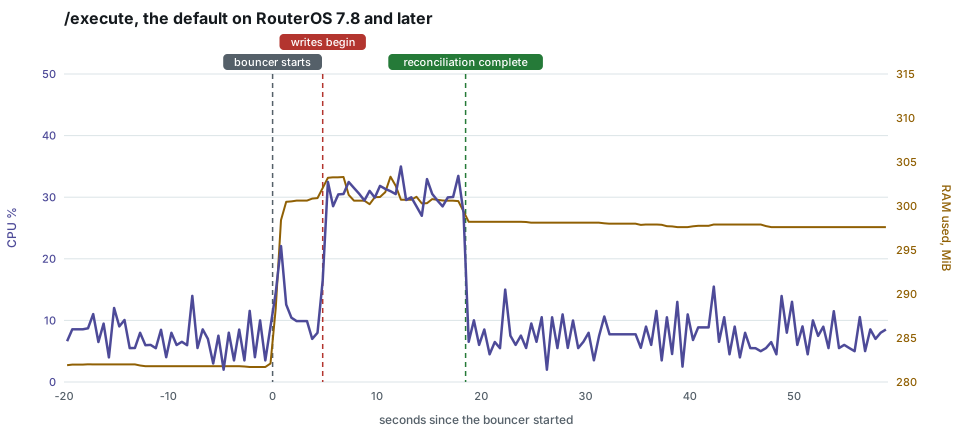
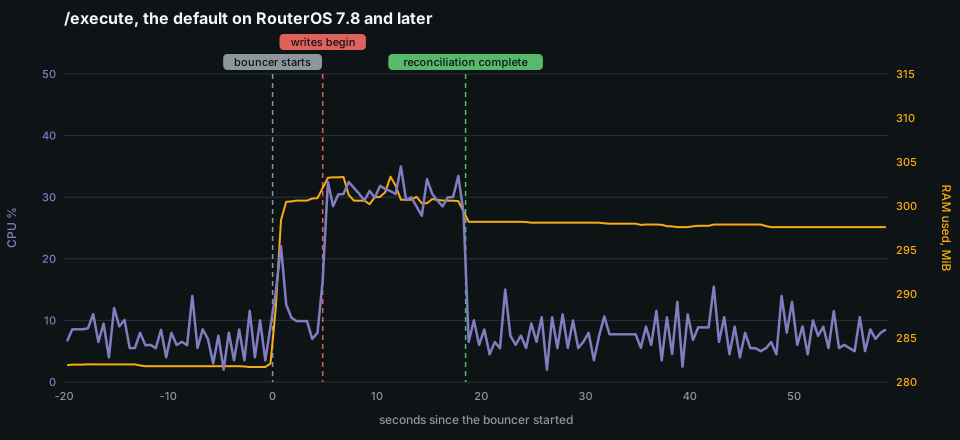
With the defaults, filling empty lists with 17,361 entries holds about 31% of
this router’s four cores for 13.7 seconds, with a 100 ms peak of 45%, and the
first reconciliation is complete 18.5 seconds after the bouncer starts. Most of the
RAM step comes when it connects, before the first entry; afterwards the router
holds about 16 MiB more than without the bouncer. That is the cost of a start
with empty lists, or of a pass that has to write much of the list again; a
later pass that finds nothing missing still reads both lists back, about
1.5 seconds of router work at this size every reconciliation_interval (see
below).
Through the stored scripts RouterOS before 7.8rc1 gets, the same entries took
24.1 seconds on this router, at about twice the CPU time, and
bulk_add_method: api took
22.8 seconds over ten sessions. Benchmarking
has the three side by side and how they were measured.
Router CPU
Section titled “Router CPU”mikrotik.cpu_limit (default 80) slows the bouncer’s reconciliation work down while the router’s CPU is busy; MikroTik Configuration describes how. Lower it on a router that must keep more headroom for routing. Raise it, or set 0, on a router that runs near its limit all the time and would otherwise load every list at the slowest pace. crowdsec_bouncer_routeros_throttled and crowdsec_bouncer_routeros_throttle_seconds_total show when the bouncer slowed down and for how long.
A CHR on an oversubscribed host can be short of CPU without its cpu-load showing it: time the host takes away does not count as busy inside RouterOS. The limit does not see that case; the bouncer’s commands just take longer.
Timeouts
Section titled “Timeouts”Increase mikrotik.command_timeout if RouterOS is slow during large list operations:
mikrotik: command_timeout: "60s"Increase mikrotik.connection_timeout only when the initial TCP/API login itself is slow:
mikrotik: connection_timeout: "20s"Reconciliation interval
Section titled “Reconciliation interval”Startup reconciliation always runs. Periodic reconciliation repairs drift after startup.
crowdsec: reconciliation_interval: "15m"Use 0 to disable periodic reconciliation, or a value of 1m or greater to enable it. Values between 0 and 1m are rejected at startup.
Short intervals repair drift faster but read the whole RouterOS address list more often. What that costs is measurable: on an RB5009 holding 22,332 entries a no-drift pass takes 1.86 s, of which the two list reads are 98.5%. At the default 15m that is a 0.2% duty cycle; at 1m it is 3.1%.
The cost scales with how many entries the router holds, not with how much drift there is to repair — a pass that finds nothing costs very nearly what a pass that fixes something costs. So the interval is worth lengthening on a large list and a modest router, and there is little to gain from shortening it below what your tolerance for undetected drift actually requires.
Processed traffic metrics
Section titled “Processed traffic metrics”metrics.track_processed creates passthrough counting rules so the bouncer can report total evaluated traffic, not only dropped traffic.
metrics: track_processed: trueSet it to false to avoid those extra counting rules:
metrics: track_processed: falseBaseline example
Section titled “Baseline example”crowdsec: origins: ["crowdsec", "cscli"] reconciliation_interval: "30m"
mikrotik: command_timeout: "60s" pool_size: 6
metrics: enabled: true routeros_poll_interval: "30s" track_processed: trueFor small routers, prefer local-only mode, pool_size: 1 or 2, and avoid full CAPI until you have measured reconciliation time.